
Wazamba Login


Casino Welcome Bonus
100% up to $750
+ 200 Free Spins
Wazamba login gives access to both the casino and sportsbook sections through a single account and one balance. Players log in with their registered email address or account ID and password. Wazamba also supports login via PlayID, letting players access their account using their PlayID credentials instead of a separate password.
How to Log In
Logging in to Wazamba takes a few seconds. Enter the registered email address or account ID, along with the account password, and confirm to access the account.
To log in with PlayID instead, select the PlayID option on the login screen and confirm with the linked PlayID credentials.
The same login process applies on mobile. Wazamba’s site is accessible through a mobile browser, so no separate app download is required. Players enter the same email or account ID, password, or PlayID credentials, and reach the same casino and sportsbook sections as on desktop.
Password Recovery
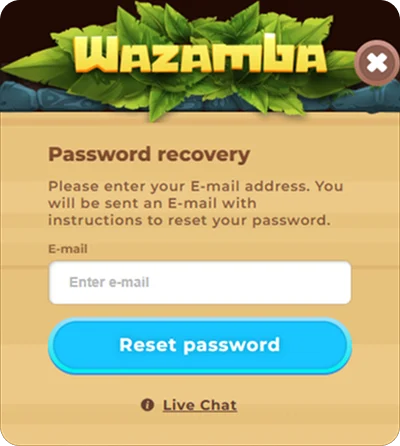
If the password is forgotten, Wazamba provides a reset option directly on the login screen.
- Click “Forgot password” on the login screen.
- Enter the registered email address linked to the account.
- Open the reset link sent to that email address.
- Set a new password to complete the reset.
If any issue comes up during password recovery, a live chat button is available on the same window, connecting directly to Wazamba support.
Troubleshooting Common Login Issues
If login doesn’t go through, a few common causes can usually explain it.
- Incorrect email or password: Double-check the entered details for typos, or use the password reset option on the login screen.
- Unverified email address: The account must be verified before login is possible. Check the inbox for the verification email sent at registration.
- Account under review: Accounts pending identity verification may have limited or paused access until the review is complete.
- Browser or cache issues: Clearing the browser cache or trying a different browser can resolve display or loading problems on the login page.
If none of these resolve the issue, Wazamba support is available through live chat, directly from the login screen.
Account Security
Wazamba requires passwords to meet a minimum standard at registration: at least 9 characters, including 1 number, 1 lowercase letter, and 1 uppercase letter.
Beyond the minimum requirement, a few practices help keep the account secure:
- Use a unique password, not reused from other accounts or services.
- Avoid sharing login credentials, including email, password, or PlayID details, with anyone else.
- Log out of the account when using a shared or public device.
- Update the password periodically, and immediately if any unauthorized access is suspected.
What You Can Do After Logging In
Once logged in, players have full access to all Wazamba features across both casino and sportsbook sections. This includes the full casino library, covering slots, table games, and live casino, along with demo mode on eligible slots for trying a game before depositing. Players can claim available bonuses, track wagering progress, and manage deposits and withdrawals through supported payment methods.
The sportsbook is accessible from the same account, letting players place pre-match and live bets without a separate login. Account settings, including personal details and password, are managed from the same dashboard, alongside responsible gambling tools such as deposit and session limits. Live chat support is also available directly from the account.